DCP Data Android app for DCP test recording on site.
DCP Data is the field step in the DCP workflow. It records Dynamic Cone Penetrometer tests on Android and prepares a structured record for office reporting.
It is for pavement engineers, testing contractors, site technicians, and consultants who want a cleaner
route from the first DCP test record to the later report.
Best fit when the main problem starts with field capture, paper notes, or inconsistent DCP records.
What problem DCP Data solves
It replaces loose field notes and later retyping with a structured DCP record created while the test is being carried out.
Why teams use it
In many DCP workflows, the office is not delayed by the calculation alone. The delay starts earlier when the first record is handwritten, incomplete, or inconsistent between operators.
DCP Data is intended to tighten that first stage so the reporting step starts from clearer information.
Where it fits
DCP Data is not the reporting tool. It is the field capture step that feeds the office-side reporting stage handled by DCPAnalyser.
Who it is for
DCP Data is aimed at the field side of pavement investigation work.
Site technicians
Record DCP results as the work happens rather than relying on later transcription.
Testing contractors
Improve consistency between operators and jobs when DCP tests are recorded on site.
Pavement engineers
Start the reporting workflow from a cleaner field record.
Consultants
Capture DCP test data in a format that is easier to check and report from later.
Main workflow steps
DCP Data is designed around the normal sequence of a DCP field record and handoff.
1
Set up the test record
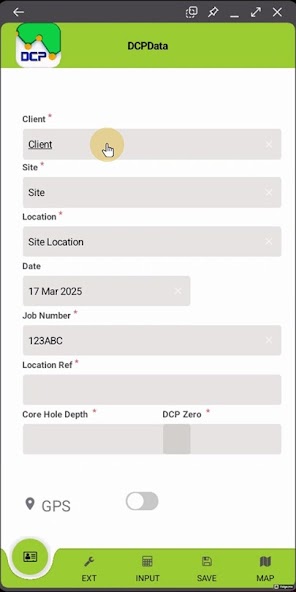
Enter the client, site, date, job number, and test location before the DCP test begins.
2
Record the DCP test on site
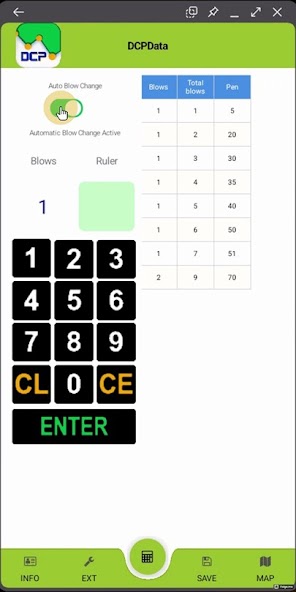
Capture blows, penetration, extension details, and supporting site information while the test is being carried out.
3
Pass the record into reporting
Use the structured file as the starting point for office work rather than retyping notes into the reporting stage.
Key features
These are the practical parts of the workflow visible from the live app and current site content.
Records blows and depth of penetration during the test.
Can vary the blow spacing target to work towards roughly 10 mm per blow, which helps when identifying likely layer boundaries.
Handles up to two extensions during testing, so the operator can enable an extension and read the ruler without doing the overall penetration maths manually.
Stores job, site, and location information with the same record.
Tracks extension shafts, depth details, and field context.
Produces a structured `.dcp` file for the next reporting step.
Supports a cleaner site-to-office handoff than handwritten notes.
Helps reduce repeated typing before DCP reporting begins.
Checks that the next reading is deeper than the last one, which helps stop the record going backwards by accident.
Works alongside DCPAnalyser in the wider DCP workflow.
Can be reviewed alongside the buyer guides in the resources section.
Proof from the live field app
The screenshots below show the DCP field workflow already exposed by the public site.
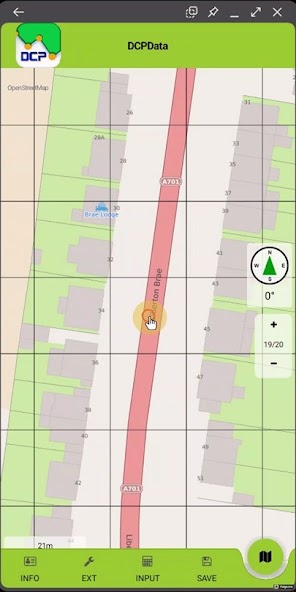
Setup screen for the main job, site, and location details before testing starts.Live blow-entry view showing the running penetration table during the DCP test.Map view used to check the logged test position against the site location.
These answers match the visible page content and the structured data on this page.
What is DCP Data used for?
DCP Data is used for recording Dynamic Cone Penetrometer tests on site in a structured digital format.
Is DCP Data a general site diary app?
No. DCP Data is a specialist field app for DCP testing rather than a general site diary or broad inspection tool.
Can DCP results be reported without retyping site notes?
That is the workflow DCP Data supports. It prepares a structured field record so the office can continue from captured data instead of retyping handwritten notes.